This documentation is collaborative, you can improve it using a pull request.
Features
* (09/2021) add support for generating CITATION.cff files with helper script bibtex-to-cff.php* (01/2017) support basic composer support
* (02/2016) support for OpenGraph metadata
* (10/2015) support for filtering bibtex fields
* (10/2013) support for localization (see below)
* (07/2012) new label types (see config value ABBRV_TYPE)
* (10/2011) if a bibtex entry contains a field gsid (like Google Scholar ID), bibtexbrowser includes a link [cites] to the cited-by page of Google Scholar (e.g. http://scholar.google.com/scholar?cites=15080874515065717592)
* (03/2011) bibtexbrowser includes a hide/show mechanism for bibtex entries (in Javascript, see configuration variable BIBTEXBROWSER_USE_PROGRESSIVE_ENHANCEMENT)
* (10/2010) bibtexbrowser now supports cross-references (Bibtex crossref)
* (09/2010) bibtexbrowser now supports multiple bibtex files (
bibtexbrowser.php?bib=file1.bib;file2.bib)* (05/2010) bibtexbrowser adds links to your co-author pages if you define the corresponding @string (see function addHomepageLink)
* (01/2010) bibtexbrowser can handle user-defined bibliographic styles
* bibtexbrowser generates publication RSS feeds (simply add &rss at the end of the URL)! demo
* (10/2009) bibtexbrowser is able to generate a bibtex file containing only the selected entries (simply add &astext at the end of the link)
* (10/2009) bibtexbrowser is now independent of the configuration of register_globals
* (01/2009) bibtexbrowser allows multi criteria search, e.g. demo
* bibtexbrowser generates COinS metadata for automatic import of bibliographic entries with Zotero and Mendeley.
* bibtexbrowser generates Google Scholar metadata so as to improve the visibility of your papers on Google Scholar.
* bibtexbrowser replaces constants defined in @STRING
* bibtexbrowser is very fast because it keeps a compiled version of the bibtex file (PHP object serialized)
* bibtexbrowser is compatible with PHP 4.x and PHP 5.x
* bibtexbrowser can display the menu and all entries with framesets demo
* bibtexbrowser can display all entries out of a bibtex file demo
* bibtexbrowser can display all entries for a given year demo
* bibtexbrowser can display a single bibtex entry demo
* bibtexbrowser can display found entries with a search word (it can be in any bib field) demo
* bibtexbrowser can display all entries with a bib keyword e.g. "?keywords=components". It matches against the "keywords" bibtex field. demo
* bibtexbrowser outputs valid XHTML 1.0 Transitional
* bibtexbrowser can display all entries for an author demo
* bibtexbrowser can be used with different encodings (change the default iso-8859-1 encoding if your bib file is in UTF-8
define('BIBTEX_INPUT_ENCODING','UTF-8') )* bibtexbrowser is easy to install: just a single file.
Download
For feature requests or bug reports, please comment this page below; patches can be contributed as pull requests on github:)Stable Version: bibtexbrowser.php
Changelog
Don't hesitate to contact me to be added in the lists of bibtexbrowser users:-)
Bibtexbrowser Ecosystem
The following uses bibtexbrowser under the hood:
* A pretty-printer and cleaner for Bibtex
* A custom citation style for bibtexbrowser adhering to the IEEE citations guidelines (on github)
* Generating publication lists in Latex using http://www.monperrus.net/martin/bibtex2latex
* Feeding a MySQL database from the content of a bibtex file
* Publication lists in Wordpress with wp-publications
* Publication lists with HAL and bibtexbrowser
* Generating publication lists in DokuWiki using the bb4dw plugin
Demo and screenshot
Demo: Here, you can browse a bibtex file of Martin's papers.
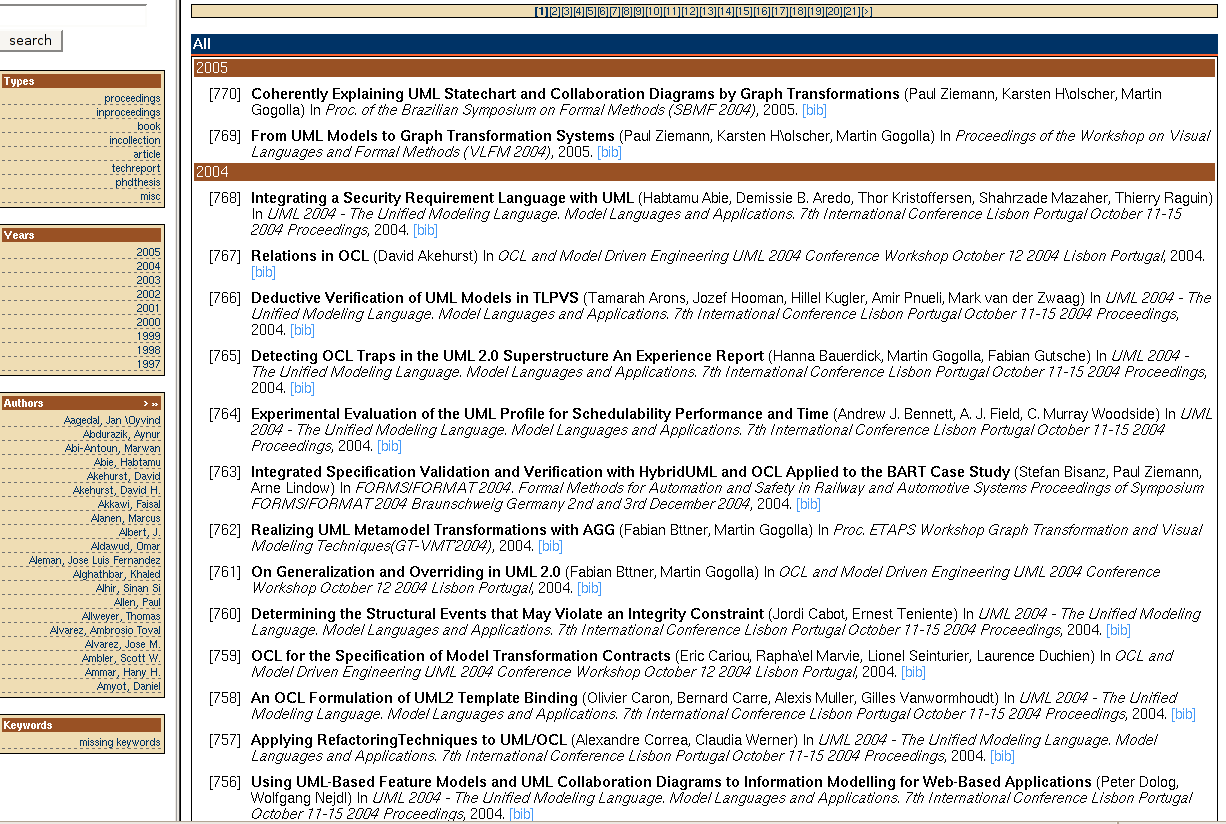
Basic installation
Create a bib file with the publication records (e.g. csgroup2008.bib) and upload it to your server.* Use the link
bibtexbrowser.php?bib=csgroup2008.bib (frameset based view)* Use the link
bibtexbrowser.php?bib=csgroup2008.bib&all (pub list sorted by year)* Use the link
bibtexbrowser.php?bib=csgroup2008.bib&all&academic (pub list sorted by publication type, then by year, see "Sectioning in academic mode" below)Warning: bibtexbrowser maintains a cached version of the parsed bibtex, for high performance, check that PHP can write in the working directory of PHP.
Handling mutliple bibtex files: If you want to include several bibtex files, just give bibtexbrowser the files separated by semi-columns e.g:
bibtexbrowser.php?bib=strings.bib;csgroup2008.bibFAQ
How to embed Bibtexbrowser into a website?
To embed Bibtexbrowser into a website, you could use it as a library:
<?php
$_GET['library']=1;
define('BIBTEXBROWSER_BIBTEX_LINKS',false); // no [bibtex] link by default
require_once('bibtexbrowser.php');
global $db;
$db = new BibDataBase();
$db->load('biblio.bib');

// printing all 2014 entries
// can also be $query = array('year'=>'.*');
$query = array('year'=>'2014');
$entries=$db->multisearch($query);
uasort($entries, 'compare_bib_entries');

foreach ($entries as $bibentry) {
  echo $bibentry->toHTML()."
";
}
?>
How to embed a publication list in an home page?
| Sorted by year | Sorted by publication type | |
|---|---|---|
| For a group/team/lab |
<?php $_GET['bib']='csgroup2008.bib'; $_GET['all']=1; include( 'bibtexbrowser.php' ); ?> |
<?php $_GET['bib']='csgroup2008.bib'; $_GET['all']=1; $_GET['academic']=1; include( 'bibtexbrowser.php' ); ?> |
| For an individual |
<?php $_GET['bib']='mybib.bib'; $_GET['author']='Martin Monperrus'; include( 'bibtexbrowser.php' ); ?> |
<?php $_GET['bib']='mybib.bib'; $_GET['author']='Martin Monperrus'; $_GET['academic']=1; include( 'bibtexbrowser.php' ); ?> |
define('USE_FIRST_THEN_LAST',true); either to the php-query, or to bibtexbrowser.local.phpHow to change the reference style?
By modifying the CSS
If bibtexbrowser.css exists, it is used, otherwise bibtexbrowser uses its own embedded CSS style (see function bibtexbrowserDefaultCSS). An example of CSS tailoring is:
.date {   background-color: blue; }
.btb-header { }
.rheader {  font-size: large }
.bibref {  padding:3px; padding-left:15px;  vertical-align:top;}
.bibtitle { font-weight:bold; }
.bibbooktitle { font-style:italic; }
For instance, one can tweak the output by disabling the display of some headers and pieces of information.
.bibmenu {display:none} /* disables the [bibtex] and the like */
.bibanchor {display:none} /* disables the index [1] or [Name2010], etc. depending on the value of the configuration value ABBRV_TYPE and BIBTEXBROWSER_LAYOUT
.theader {display:none}
.sheader {display:none} /* disables the year header e.g., 2001 */
By setting your own style function
The bibliography style is encapsulated in a function. If you want to modify the bibliography style, you can copy the default style in a new file, say
bibtexbrowser-yourstyle.php, and rename the function DefaultBibliographyStyle in say MyFancyBibliographyStyle.Then, add in the file
bibtexbrowser.local.php:
<?php
function MyFancyBibliographyStyle(&$bibentry) {
  return $bibentry->getTitle().' ('.$bibentry->formattedAuthors(.')';
}
define('BIBLIOGRAPHYSTYLE','MyFancyBibliographyStyle');
?>
How to use the IEEE bibliographic style?
Create a file `bibtexbrowser.local.php`, in the same folder as `bibtexbrowser.php`, containing:
<?php
// JanosBibliographyStyle is the IEEE contributed by Janos Tapolcai
define('BIBLIOGRAPHYSTYLE','JanosBibliographyStyle');
?>
See also another custom citation style for bibtexbrowser adhering to the IEEE citations guidelines (on github).
How to change the link style?
By default each bibliographic entry is followed by
[bibtex] [pdf] [doi], etc.
This can be tailored by configuring as follows (in the file
bibtexbrowser.local.php)
<?php
define('BIBTEXBROWSER_LINK_STYLE','MyFancyBib2links');
function MyFancyBib2links(&$bibentry) {
  // bib is a special type of link. without the url argument or with an invalid image, it prints '[bibtex]'
  $result = $bibentry->getBibLink();

  $result .= ' '.$bibentry->getLink('url');

  // Google Scholar ID. empty string if no gsid field present
  $result .= ' '.$bibentry->getGSLink();

  // returns an empty string if no doi field present
  $result .= ' '.$bibentry->getDoiLink();

  return $result;
}
?>
You can use your personalized function to add support for new fields in bibtex (
pdf, file, etc.). Check-out the documentation of functions getLink(), getBibLink(), getGSLink() and getDoiLink(): they accept an optional argument for providing an image/icon instead of printing text.
  // returns an empty string if no pdf field present
  $result .= $bibentry->getLink('pdf','http://url.to/icons/pdf.png');
  // returns an empty string if no slides field present
  $result .= $bibentry->getLink('slides');
  // returns an empty string if no poster field present
  $result .= $bibentry->getLink('poster');
How to specify the encoding of bibtex files (UTF-8/ISO-8859-1/etc.)?
By default, bibtexbrowser assumes that the bibtex file is UTF-8 encoded. If you want to change it to e.g. ISO-8859-1, add intobibtexbrowser.local.php:define('BIBTEX_INPUT_ENCODING','ISO-8859-1');
Note that if the bibtex only contains latex-encoded diacritics (e.g. \'e), it does not matter. The encoding of the bibtex file and the one of the generated HTML is identical.How to disable Javascript progressive enhancement?
add intobibtexbrowser.local.php:define('BIBTEXBROWSER_USE_PROGRESSIVE_ENHANCEMENT',false);How to remove the "[bibtex]" links?
@define('BIBTEXBROWSER_BIBTEX_LINKS',false);How to change the reference indices?
The configuration of ABBRV_TYPE drives the indices
// index => [1] The essence of metamodeling
// year => [2005] The essence of metamodeling
// x-abbrv => [SoSyM] The essence of metamodeling if the bibtex entry contains a field x-abbrv
define('ABBRV_TYPE','year');// may be year/x-abbrv/key/none/index
One can also extend class SimpleDisplay to tweak the indices.For instance, this configuration ...
// bibtexbrowser.local.php
class SimpleDisplayExt extends SimpleDisplay {
  // overriding the default
  function setIndices() {
    $this->setIndicesInIncreasingOrderChangingEveryYear();
  }
}
bibtexbrowser_configure('BIBTEXBROWSER_DEFAULT_DISPLAY','SimpleDisplayExt');
results in resetting the numeric indices every year as follows2017 [1] article1... (2017) [pdf] [doi] [2] article2... (2017) [pdf] [doi] [3] article3... (2017) [pdf] [doi] etc.. 2016 [1] article1... (2017) [pdf] [doi] [2] article2... (2017) [pdf] [doi] [3] article3... (2017) [pdf] [doi]
How to use the "Academic style"?
The default academic mode creates four sections:
- books
- articles and book chapters
- workshop papers (for entries containing "workshop" in the field booktitle)
- others
You may create your own one in
bibtexbrowser.local.php (see also "creating a bibtexbrowser.local.php" below):
define('BIBLIOGRAPHYSECTIONS','my_sectioning');
function my_sectioning() {
return
  array(
  // Books
    array(
      'query' => array(Q_TYPE=>'book'),
      'title' => 'Books'
    ),
  // Articles
    array(
      'query' => array(Q_TYPE=>'article'),
      'title' => 'Refereed Articles'
    ),
  // Conference and Workshop papers
    array(
      'query' => array(Q_TYPE=>'inproceedings'),
      'title' => 'Conference and Workshop  Papers'
    ),
  // others
    array(
      'query' => array(Q_TYPE=>'misc|phdthesis|mastersthesis|bachelorsthesis|techreport'),
      'title' => 'Other Publications'
    )
  );
}
How to get the individual bib pages embedded as well?
define('BIBTEXBROWSER_URL',""); How to add links to the slides of a conference/workshop paper?
You can simply fill thecomment field of the bib entry with an HTML link:
@inproceedings{foo,

author="Jean Dupont",

title="Bibtexbrowser",

year=2009,

booktitle="Proceedings of the BIB conference",

comment={[slides]}

}
This comment field can also be used to add acceptance rates and impact factors.How to localize bibtexbrowser?
Add inbibtexbrowser.local.php:<?php global $BIBTEXBROWSER_LANG; $BIBTEXBROWSER_LANG=array(); $BIBTEXBROWSER_LANG['Refereed Conference Papers']="Conférences avec comité de lecture"; ... $BIBTEXBROWSER_LANG['Year']="Année"; ?>
How to change the default frame?
Add inbibtexbrowser.local.php:
<?php
// or any valid query: year=2010, author=Jane, etc.
@define('BIBTEXBROWSER_DEFAULT_FRAME','all');
?>
How to configure the sorting order of Bibtex entries?
The default order is first by bibtex field year, then by bibtex field month, per functions `compare_bib_entry_by_year` and `compare_bib_entry_by_month`.
You can change this with
define('ORDER_FUNCTION',...) and define('ORDER_FUNCTION_FINE',...) in bibtexbrowser.local.php:
<?php

function my_own_order($a, $b) {
  return strcmp($a->getKey(),$b->getkey());
}

define('ORDER_FUNCTION','my_own_order');
?>
How to change the title of the result page?
You may create your own title function in
bibtexbrowser.local.php (see "creating a bibtexbrowser.local.php" below):
define('BIBLIOGRAPHYTITLE','my_title_function');
function my_title_function($query) {
  return "Publications of the Nuclear Research Group";
}
See function DefaultBibliographyTitle for inspiration.How to disallow crawler indexing?
Add in
bibtexbrowser.local.php (see "creating a bibtexbrowser.local.php" below):
define('BIBTEXBROWSER_ROBOTS_NOINDEX', true);
How to load Bibtex from a dynamic string?
You can use the special
php://memory feature in a new dispatcher.Add in
bibtexbrowser.local.php:
define("BIBTEXBROWSER_MAIN", 'DynamicDispatcher');
and then in bibtexbrowser.after.php:
<?php
class DynamicDispatcher extends Dispatcher {
  function getDB() {
    $data = fopen('php://memory','x+');
    $dynamic_string = "@book{aKey,title={A Book},author={Jan Doe},publisher={Springer},year=2009}\n";
    fwrite($data, $dynamic_string);
    fseek($data,0);
    $db = new BibDataBase();
    $db->update_internal("inline", $data);
    return $db;
  }
}
?>
How to load bibliographic data in other formats?
If your bibliographic data comes from XML or a database, you can still browse it with bibtexbrowser as follows:
Add in
bibtexbrowser.local.php:
define("BIBTEXBROWSER_MAIN", 'PgmDispatcher');
and then in bibtexbrowser.after.php:
<?php
class PgmDispatcher extends Dispatcher {
  function getDB() {
    $db = new BibDataBase();

    // builds the first entry
    $entry = new BibEntry();
    $entry->setType("article");
    $entry->setField("title", "foo");
    $entry->setField("year", "2014");
    $entry->setKey("kolp");
    $db->addEntry($entry);

    // builds the second entry
    $entry2 = new BibEntry();
    $entry2->setType("article");
    $entry2->setField("title", "bar");
    $entry2->setField("year", "2013");
    $entry2->setKey("tili");
    $db->addEntry($entry2);

    return $db;
  }
}
?>
How to remove fields from the bibtex text?
If you want to remove some fields (e.g. abbrv and comment) from the resulting bibtex, add in
bibtexbrowser.local.php:
<?php
define('BIBTEXBROWSER_BIBTEX_VIEW','reconstructed');
define('BIBTEXBROWSER_BIBTEX_VIEW_FILTEREDOUT','abbrv|comment');
?>
How to activate page numbering in the output?
Add in
bibtexbrowser.local.php:
<?php
bibtexbrowser_configure('BIBTEXBROWSER_DEFAULT_DISPLAY','PagedDisplay');
bibtexbrowser_configure('PAGE_SIZE','3');
?>
How to override framesets and headers?
You can customize every view as follows, in particular by playing with
BIBTEXBROWSER_URL.frameset.html:menu.php:
MENU (no header sent)
<?php
define('BIBTEXBROWSER_URL','output.php');
$_GET['menu']=1;
$_GET['bib']='foo.bib';
include('bibtexbrowser.php');
?>
output.php:
OUTPUT (no header sent)
<?php
define('BIBTEXBROWSER_URL','elem.php');
include('bibtexbrowser.php');
?>
elem.php:
ELEM (no header sent)
<?php
include('bibtexbrowser.php');
?>
How to add hyperlink to the authors' web pages?
You must add a
@string block in the bibtex file, which contains the links. The key is a concatenation of hp_ and then FirstNameLastName (no space). For instance:
@String {
  hp_ericfoo      = {http://www.foo.de/},
  hp_joebar      = {http://www.joebar.me/},
}
How to modify bibtex entries on the command line?
Use
bibtexbrowser-cli.php. For instance:php bibtexbrowser-cli.php mybib.bib --id classical --set-title \"a new title\" --id with_abstract --set-title \"a new title\" --set-year 1990
How to use with composer?
Bibtexbrowser can now be downloaded from packagist with composer.In your project's `composer.json`, just add this
"monperrus/bibtexbrowser": "dev-master". E.G.:
{
    "require": {
        "monperrus/bibtexbrowser": "dev-master"
    }
}
With composer, a test server can be started with the following commands:cd vendor/monperrus/bibtexbrowser/
composer serveWhich runs this script:
php -S localhost:29896 bibtexbrowser.phpNow, to display a particular bibtex file in your browser, the URI should be of this form:
localhost:29896/?bib=bibfile.bibNote the forward slash following the port number.
How to add a banner to the main view in frameset mode?
For instance, if you want to add a "home page" button in the main view of the frameset mode, add a banner function in
bibtexbrowser.local.php as follows:
<?php
function bibtexbrowser_top_banner() {
  return 'Home page';
}
?>
How to configure the type of metadata that bibtexbrowser generates?
Bibtexbrowser can generate Coins, Google Scholar, Dublin Core (DC), Opengraph and Eprints metadata. This can be configured in
bibtexbrowser.local.php as follows:
<?php
@define('METADATA_COINS',true); // see https://en.wikipedia.org/wiki/COinS
@define('METADATA_GS',false); // metadata google scholar, see http://www.monperrus.net/martin/accurate+bibliographic+metadata+and+google+scholar
@define('METADATA_DC',true); // see http://dublincore.org/
@define('METADATA_OPENGRAPH',true);  // see http://ogp.me/
@define('METADATA_EPRINTS',false); // see https://wiki.eprints.org/w/Category:EPrints_Metadata_Fields
?>
How to run the test for another PHP version?
Find the right image on Docker, eg
8.3.11-cli-alpine, and create `container/Dockerfile`FROM php:8.3.11-cli-alpine RUN apk add phpunit WORKDIR /tmp CMD [ "phpunit"]Then,
docker build container, and docker run -v /path/to/bibtexbrowser.dir:/tmp -ti 4f3591b79a60 /tmp/BibtexbrowserTest.php Related tools
Old-fashioned:
bibhtml, bib2html, bibtohtml, bibtextohtml, bibtex2html, bibtex2web, stratego bibtex module
Unlike them, bibtexbrowser is dynamic, i.e. generates the HTML pages on the fly. Thus, you do not need to regenerate the static HTML files each time the bib file is changed.
Heavyweight:
PHP BibTeX Database Manager, bibadmin, basilic, phpbibman, aigaion, refbase, wikindx, refdb
Unlike them, bibtexbrowser does not need a MySQL database.
Main competitor:
SimplyBibtex has the same spirit, but the project seems dead since 2006
Misc:
This matlab script is similar
Copyright
This script is a fork from an excellent script of Joel Garcia, Leonardo Ruiz, and Yoonsik Cheon from the University of Texas at El Paso.
Bibtexbrowser is free software; you can redistribute it and/or modify it under the terms of the GNU General Public License as published by the Free Software Foundation; either version 2 of the License, or (at your option) any later version.